
Payment Page: Dynamic QR & Wallet Transfer Guide
A complete step-by-step walkthrough of the Hashpay Webview transfer screen: dynamic QR codes, single-use destination deposit addresses, scanning with MetaMask and WalletConnect, and crucial centralized exchange withdrawal fee warnings.
Anatomy of the transfer screen (Payment Page)
Once the exchange rate is locked, the Webview renders the active Payment Page displaying all technical parameters required to execute the on-chain transfer:
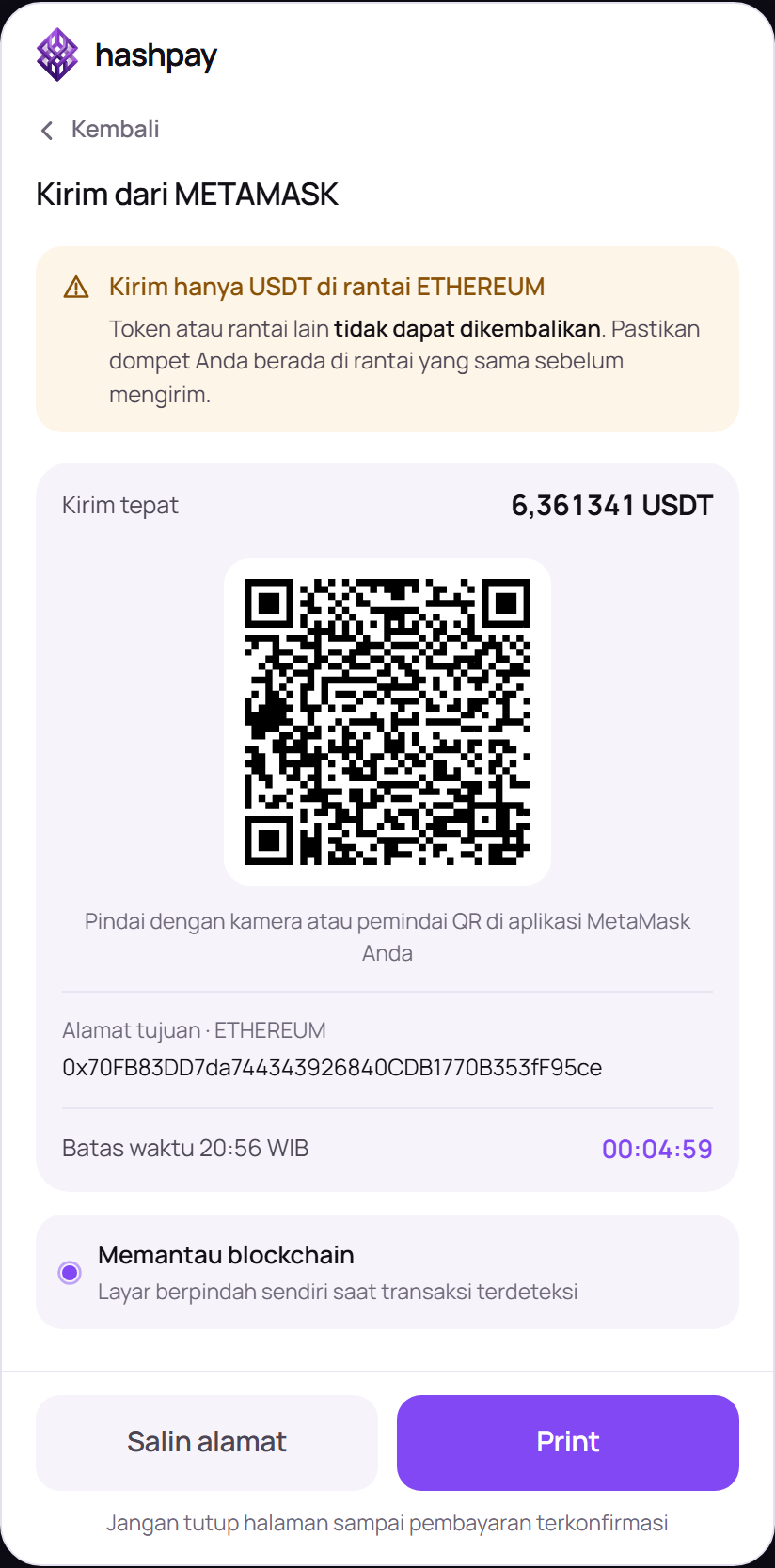
- Network Warning Banner — Explicitly specifies the required asset and blockchain network (e.g. *'Kirim hanya USDT di rantai ETHEREUM. Token atau rantai lain tidak dapat dikembalikan. Pastikan dompet Anda berada di rantai yang sama sebelum mengirim'*).
- Exact Amount Indicator (Kirim tepat) — Displays the exact crypto amount required down to 6 decimal places (e.g.
6,361256 USDT). - Dynamic QR Code — Encoded with standard EIP-681/BIP-21 metadata containing the exact recipient address and bill amount.
- Single-Use Destination Address (Alamat tujuan) — A dedicated, unique blockchain address generated specifically for this invoice (e.g.
0x9b37272D28B50D32351D503C9e5Bc55046514434). - Payment Countdown Timer — Displays the remaining window before address expiration (e.g.
00:04:58). - Real-Time Mempool Watcher (Memantau blockchain) — A pulsing indicator confirming that Hashpay's node watchers are actively monitoring the blockchain mempool for incoming transfers (*'Layar berpindah sendiri saat transaksi terdeteksi'*).
- Action Buttons — Salin alamat (Copy Address) to copy the 42-character hexadecimal string and Print to export a printable transfer slip.
How to pay using MetaMask (Mobile Scan & Browser Extension)
- Mobile App QR Scanning — Open the MetaMask mobile app on iOS or Android. Ensure your wallet is switched to the matching network (e.g. Ethereum or BNB Chain). Tap the QR scanner icon located at the top-right corner of the MetaMask dashboard and point your phone camera at the QR code displayed on screen. MetaMask automatically extracts the deposit address and invoice total.
- Review Miner Gas Fee — MetaMask presents a confirmation prompt displaying the transfer total and estimated network miner gas fee. Ensure your wallet holds a small balance of the native chain token (e.g. 0.002 ETH or 0.001 BNB) to cover gas.
- Confirm Broadcast — Tap Confirm / Send. The transaction is immediately broadcast to the blockchain network.
- Desktop Browser Extension Flow — If you selected MetaMask Direct on a desktop browser, MetaMask triggers a popup window automatically. Review the pre-filled parameters and click Confirm.
How to pay using WalletConnect (300+ Web3 Wallets)
- Universal Wallet Modal — If you selected WalletConnect, a universal QR code modal renders on screen.
- Open Any Supported Wallet — Launch any Web3 mobile wallet (OKX Wallet, Rainbow, Bitget Wallet, Indodax Web3, Binance Web3 Wallet, Zerion, etc.).
- Scan Connection Code — Select the QR scanner inside your wallet app and scan the WalletConnect QR code.
- Authorize Connection Session — Tap Connect in your mobile app to link your wallet address with the checkout session.
- Sign Payment Transaction — Review the pre-populated transaction amount and tap Approve Transaction / Sign to broadcast.
4 Crucial rules for customer payment success
- Exact Amount Requirement — Never round up or down. You must transfer the exact nominal displayed (e.g.
6,361256 USDT). Sending partial amounts flags the order as Underpaid and withholds automatic order fulfillment. - Centralized Exchange Withdrawal Fee Warning (Indodax, Binance, Tokocrypto, Bybit) — If transferring from a centralized exchange account rather than a private self-custodial wallet, the exchange automatically deducts its withdrawal fee from your amount. You must add the withdrawal fee on top (e.g. if the invoice requires 6.36 USDT and the exchange fee is 1.00 USDT, request a withdrawal of 7.36 USDT so exactly 6.36 USDT arrives at Hashpay).
- Network Matching Rule — Always ensure the sending chain matches the invoice chain (e.g., never send Tron TRC-20 USDT to an Ethereum ERC-20 address). Cross-chain transfers without a bridge will result in irreversible loss of funds.
- Keep Page Open — Leave the Webview open while the node watcher monitors the blockchain. The screen transitions to success automatically within seconds of network detection.