
Supported Wallets: Direct Payment vs QR Scan
Understand the fundamental differences between Direct In-App / Browser Extension payments versus Dynamic QR Scanning, and explore how MetaMask, Trust Wallet, Phantom, and WalletConnect integrate into the Hashpay checkout flow.
Anatomy of the wallet selection screen (Step 2)
After selecting your preferred token and blockchain network, the Webview advances to Step 2: Choose Wallet. The top navigation strip displays your selected asset context (e.g. USDT · ETHEREUM) alongside an Ubah (Change) button to switch networks or tokens at any time.
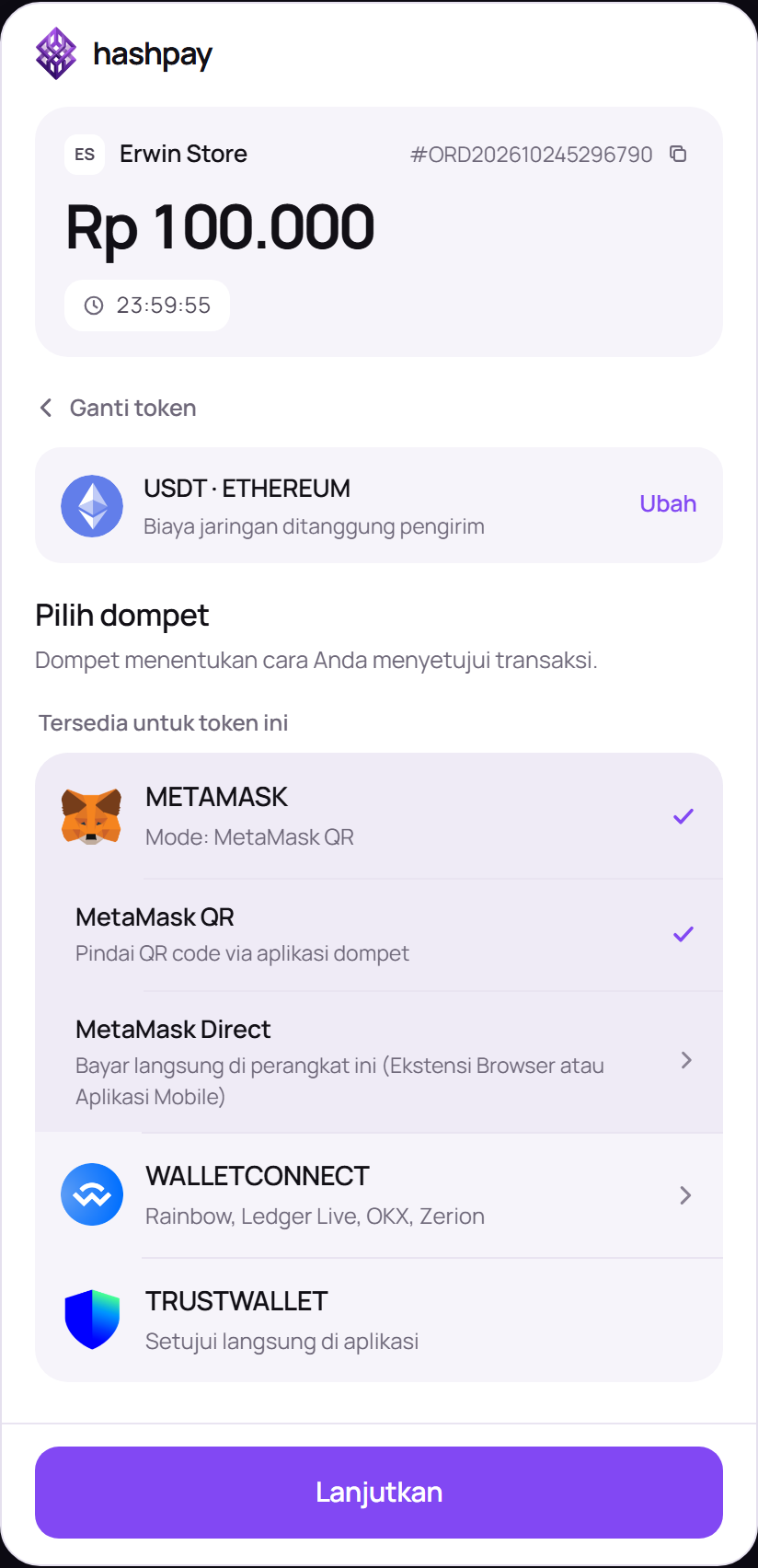
Fundamental differences: Direct Payment vs QR Scan
Hashpay accommodates both desktop workstation users and mobile smartphone shoppers by providing two distinct approval methods:
| Payment Mode | How It Works | Best Device Scenario |
|---|---|---|
| Direct Payment (Bayar Langsung) | Triggers an automated native deep-link (on smartphones) or a browser extension popup window (on desktop browsers). The customer authorizes the transfer in 1 click without manual input. | When the Webview is accessed on a smartphone with the wallet app installed, or on a desktop browser (Chrome, Brave) with a Web3 extension active. |
| QR Scan (Pindai QR) | Generates a dynamic on-screen QR code encoded with EIP-681 standard payment metadata. The customer opens their mobile wallet app and scans the code using their device camera. | When shopping on a desktop computer, laptop, or tablet while holding crypto funds on a separate smartphone wallet. |
Supported crypto wallets
- MetaMask — The benchmark Web3 wallet for Ethereum and EVM-compatible networks (BNB Chain, Polygon). Webview offers two dedicated interaction modes: MetaMask QR (scanned via the mobile camera) and MetaMask Direct (instant popup window on browser extension or native mobile deep link).
- Trust Wallet — The official multi-chain mobile wallet by Binance ecosystem. Features native support for EIP-681 standard QR scanning, pre-populating recipient address, asset contract, and exact invoice amount automatically.
- WalletConnect (300+ Web3 Wallets) — An open-source decentralized pairing protocol. Clicking WalletConnect opens a universal connection modal compatible with OKX Wallet, Rainbow, Bitget Wallet, Indodax Web3, Binance Web3 Wallet, Zerion, and hundreds more.
- Phantom — The premier high-speed wallet for the Solana blockchain ecosystem, supporting sub-second transaction signatures and micro-fee SOL transfers.
Proceeding to rate confirmation
Once your wallet and preferred payment mode (Direct or QR) are selected, the purple Lanjutkan (Continue) button at the bottom turns active. Clicking it initiates real-time price estimation and rate locking.