
QR Code & Real-Time On-Chain Monitoring
Present the dynamic EIP-681 QR code, print paper QR slips for table-service customers, and watch automated on-chain payment detection and receipt printing.
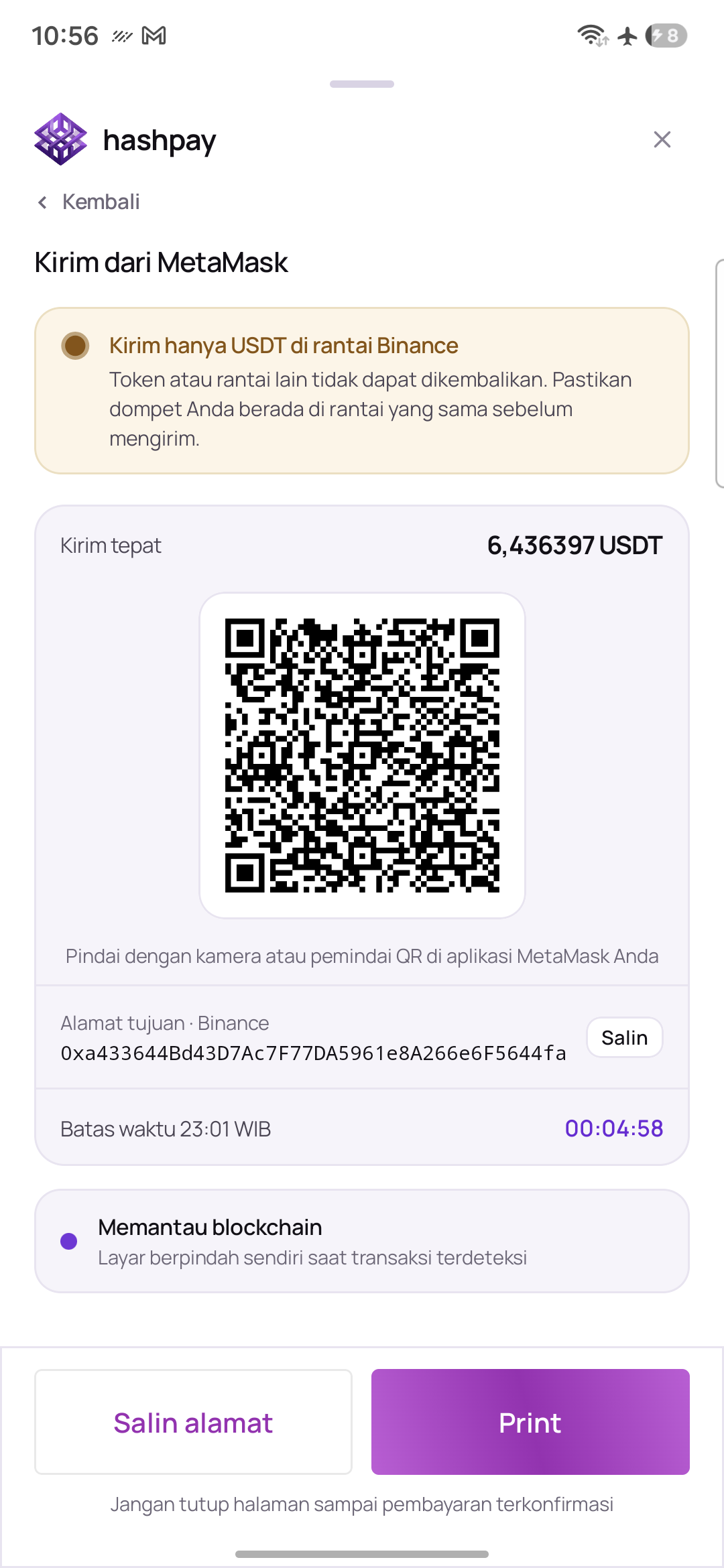
Elements on the payment QR screen
- Dynamic EIP-681 QR Code — When scanned, this smart QR auto-populates the recipient deposit address, smart contract, and exact crypto amount on the customer's phone, preventing manual copy-paste errors.
- Exact Amount Indicator — Displays the required token amount down to micro-decimals (e.g.
6.436397 USDT), including a 3-digit anti-collision identifier. - Deposit Address Box & 'Salin Alamat' — Shows the dedicated order wallet address with a quick Salin alamat (Copy Address) button for manual transfers.
- 15-Minute Payment Window — A countdown timer indicating the remaining validity of the transaction session.
- Live Blockchain Listener — A pulsing green radar indicator actively listening to the blockchain network for incoming transfer blocks.
- Back Navigation (Kembali) — Allows the cashier to return to wallet or token selection if the customer wishes to switch payment methods.
Thermal paper QR printing (Table service & dine-in)
Hashpay POS includes a unique Print QR Slip feature designed specifically for dining restaurants, cafes, hotel front-desks, and drive-throughs:
- Tap 'Print' on QR Screen — While the QR code is displayed on the terminal, simply tap the primary Print button at the bottom.
- Instant Thermal Slip — The built-in 58mm printer immediately cuts a compact paper receipt containing the dynamic QR code, store name, order ID, and exact amount in Rupiah and crypto.
- Hand Slip to Customer — The waiter can take the paper slip directly to the customer's dining table. The customer scans the printed QR from their seat using their mobile wallet without walking up to the cash register counter.
Automated on-chain confirmation & automatic receipt printing
Cashiers do not need to press any manual confirmation button or check external bank statements. Here is how the automated verification works:
- Instant Blockchain Broadcast (2–5 Seconds) — As soon as the customer authorizes the transaction in their wallet, the network node broadcasts the block.
- Automatic Screen Flip (Success Screen) — The terminal detects the on-chain transfer and flips automatically to the green Payment Success screen with an animated green checkmark (*'Pembayaran diterima'*).
- Automatic Receipt Print — The built-in 58mm thermal printer prints the official customer payment receipt automatically upon screen flip. The cashier does not need to press any print button.
- Finish Button (Selesai) — The cashier tears off the printed receipt, hands it to the customer, and taps the bottom Selesai button to return directly to the keypad ready for the next customer.
- Zero Fraud & Chargeback Protection — Once settled on the blockchain, payments are cryptographically final and cannot be disputed or reversed.